
A Menu That Takes Orders: No App, No Install
By menu-MENA Team
Published on August 29, 2026
Order mode, not a separate app
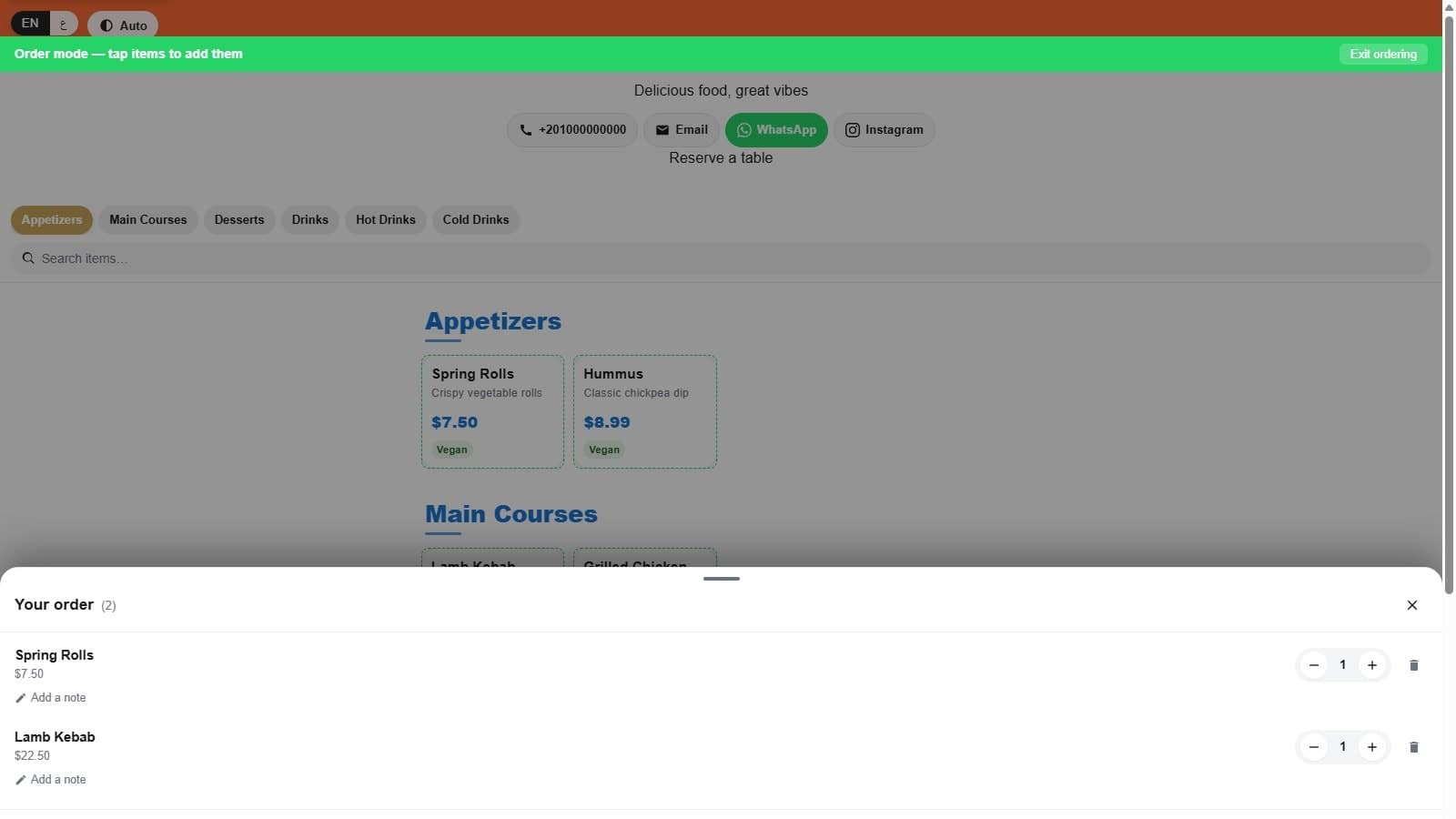
When a guest wants to order, they tap the order entry point on the menu and a green banner replaces the header: "Order mode, tap items to add them." That's the entire onboarding. No account, no download, no App Store redirect. The guest is still on the same page they used to browse the menu, in the same browser tab, and the interaction everyone already knows (tap a product, it lands in a cart) just starts working right there, wherever they arrived from a QR code and WhatsApp in the first place.
Under the hood, this cart state lives in a single provider mounted once per page, so the menu grid and the floating cart button both read and write the same order. Add an item on one card and the quantity badge on the floating button updates immediately, because they're not two widgets syncing through local storage. They're one piece of state.
The order drawer is a real cart
Tap the floating cart and a bottom sheet slides up: "Your order (2)," a list of what's been added, and a total. Each line has a quantity stepper, minus, count, plus, that responds to a tap or a press-and-hold for repeated increments, a small "Add a note" link for something like "extra spicy" or "no onions," and a trash icon.
Removing something doesn't delete it right away. It marks the line pending, slides it out with an "Undo" toast, and only actually removes it five seconds later if the guest doesn't tap Undo. Swipe a line sideways past a threshold and the same thing happens: the row reveals a red delete zone as you drag it. Undo has to restore the exact same quantity, note, and modifiers, and that five-second pending window is what makes that possible.
The running total animates when it changes rather than jumping, and it excludes whatever sits in that five-second pending-removal window, so the number a guest sees always matches what will actually reach the kitchen.
Review before anything goes out
Tapping "Review" opens a second sheet: "Review your order." This is where the cart turns into an actual order. A Dine-in/Takeaway toggle switches which fields show. A table number field appears only for dine-in and disappears for takeaway. Name and phone are both optional, and an email field appears only if the guest skipped the phone number, since every WhatsApp order becomes a customer record keyed on whichever contact detail the guest actually gave. There's a general order note field, and for restaurants that have set up modifier groups like size or add-ons, those show up under each line alongside its own note field.
If the tenant has an active coupon, a promo code field appears. Type a code and it validates against the cart total on the spot, showing the discount amount or a specific reason it failed: expired, not started yet, minimum not met. Whatever comes out the other end, subtotal, discount, tax, and grand total, is calculated once and reused everywhere those numbers get shown. The total in the drawer, the total in the review sheet, and the total in the message that gets sent can't quietly disagree with each other.
What happens when the guest taps send
Tap "Send via WhatsApp" and the app builds the order message, checks whether it fits inside a WhatsApp link, and opens wa.me with the message pre-filled. If the order is long enough to blow past WhatsApp's URL length limit, it copies the message to the clipboard instead and opens WhatsApp with an empty box for the guest to paste into. If the clipboard itself refuses, which happens in some in-app browsers, a text box shows the exact message with its own copy button. An order never just fails silently.
Every path also logs the order in the background before the WhatsApp window even finishes opening, so it shows up in your dashboard whether or not the guest actually taps send on their end.
Why this beats an app download
A branded ordering app asks for a lot before the first order: find it in a store, wait for the download, grant it permissions, and probably never open it again after one visit. A cart built into the menu page asks for none of that. The guest is already there because they scanned a QR code or clicked a link. Ordering is just what the page does next.
That's also why WhatsApp is the handoff point instead of a proprietary checkout. It's already on the guest's phone, already has their number, and the restaurant already knows how to run a WhatsApp inbox. The job of the ordering flow is to get a clean, itemized message into that inbox with as little friction as possible along the way, not to become one more app competing for a spot on someone's home screen.
What it costs
The order drawer and review sheet are part of the base menu-MENA subscription, no separate ordering add-on. The trial runs 14 days, no credit card required. After that it's 90 EGP a month or 1,000 EGP a year for one branch, with each additional branch at half price: 45 EGP a month or 500 EGP a year.