
Every WhatsApp Order Becomes a Customer Record
By menu-MENA Team
Published on August 27, 2026
The list fills up whether you look at it or not
Somewhere between your first WhatsApp order with a phone number in it and today, /admin/customers stopped being an empty page. Every order that included a phone number, every reservation (which always asks for one), quietly built a row. How that list gets built is worth reading if you haven't seen it: reservations fed it from day one, WhatsApp orders got an optional phone field, and everything keys off the phone number so the same guest doesn't turn into five separate rows.
This isn't that post. This is about what happens after the list has real names in it, because a list nobody reads is just a page that loads.
What's actually on the page
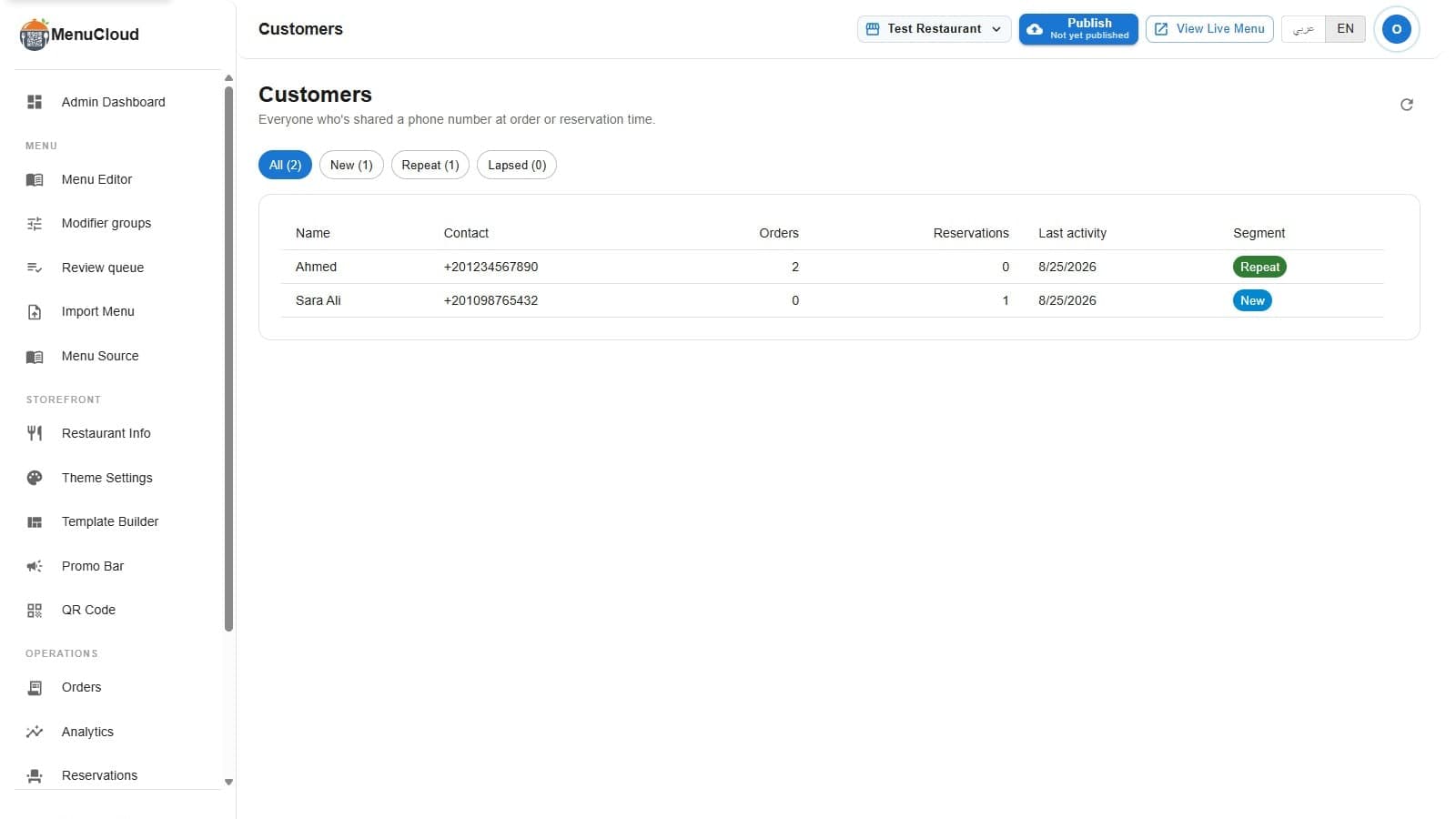
Open /admin/customers and you get filter chips across the top: All, New, Repeat, Lapsed, each with a count in parentheses. Click one and the table below it filters to just that segment. Below the chips is a table with six columns: Name, Contact, Orders, Reservations, Last activity, Segment.
Two things worth knowing about reading it. The Contact column shows whichever identifier the customer gave, phone first if there is one, email otherwise; if a record somehow has both, the second one shows as a small caption line under the first. And Last activity is exactly that, the most recent order or reservation, not the first one, so a guest who ordered once in January and again last week shows this week's date.
If nothing has come in yet, the page says so plainly: "No customers captured yet." No chart, no placeholder data pretending the feature is doing something.
How new, repeat and lapsed get decided
The three segments aren't a guess or a scoring model. They come from two numbers Firestore already tracks per customer: total visits (orders plus reservations) and how long ago the last one was.
- New: one visit so far, full stop.
- Repeat: two or more visits, with the most recent one inside the last 60 days.
- Lapsed: 60 or more days since the last order or reservation, regardless of how many came before that.
The 60-day cutoff is a plain threshold in the code, not something that adapts to your restaurant's rhythm. It means recency always wins over volume: a guest who ordered eight times last winter and hasn't shown up since counts as lapsed, sitting in the same segment as someone who ordered exactly once and vanished. If that reads odd for a seasonal spot, it's worth knowing going in rather than being surprised by it later.
Turning it into an actual habit
The page doesn't do anything on its own. It sorts and counts; you're the one who has to open it and act, which means it only pays off if checking it becomes a small routine instead of a one-time curiosity click.
A few ways owners actually use the segments, weeks into having data:
- Open Repeat before a night you know will be slow, pick two or three names, and send a personal WhatsApp: "we've got your usual tonight if you're around." That's you, not the app, messaging from your own number.
- Glance at Lapsed once a week. You won't recognize every name, and that's fine, message the ones you do. A quick "haven't seen you in a while" from the actual owner reads nothing like an automated blast.
- After running a promo code, check whether the New segment grew in the days after. That tells you the code brought in first orders, not just clicks on the announcement.
- Watch how fast Repeat grows relative to New. A restaurant where new guests rarely come back a second time has a different problem than one that just isn't getting new guests at all, and this page is where you'd first notice which one you have.
If you run more than one branch
The list is scoped to whichever branch is currently selected in the dashboard's branch switcher, the same picker you use for the menu editor and orders. Branch A's regulars and Branch B's regulars sit in two separate lists, not one combined view. If you manage several locations, checking this page means checking it per branch, switching the selector each time.
Two guests, two different plays
The screenshot on this page is real data from a test account: Ahmed, two orders, no reservations, tagged Repeat. Sara Ali, one reservation, tagged New. Neither number is large, and that's the point, the segments work the same whether a restaurant has two customers or two thousand.
Ahmed is the one worth a personal message next time there's something worth telling him about. Sara Ali isn't lapsed, isn't a lost cause, she's just early: one visit, no track record yet either way. The page doesn't tell you what to do with either of them. It just makes sure you know they exist, and that's the part that used to disappear into a WhatsApp chat thread with a hundred others just like it.