
Running a Discount Code Without a POS Upgrade
By menu-MENA Team
Published on August 27, 2026
Why this doesn't touch your POS
A restaurant that wants to run "10% off this weekend" usually hits a wall before the discount reaches anyone: the POS needs a new button, the card machine needs reprogramming, or someone has to explain a workaround to the front-of-house staff at the start of a shift. menu-MENA skips all of that because the order already lives inside the menu. A guest builds a cart and taps Send Order, and it lands in your WhatsApp as a formatted message. A coupon is one more line the platform works out before that message goes anywhere. Nothing to plug in, nothing to reconfigure at the till.
Building a code in the admin panel
Coupons sit on their own page in the sidebar, labeled Promo codes. Tap New code and the form asks for a Code (uppercase letters, digits, - and _, 3 to 32 characters, and it can't be changed once you save it), a Discount type (Percentage or Fixed amount), and a Value. Everything after that is optional: Minimum order, Total uses, Uses per customer, and a Starts / Expires date pair.
The code is the record's own ID in the database, so there's no way to end up with two live coupons sharing a word by accident. Try to reuse SAVE10 while it's still active and the save fails outright instead of quietly overwriting whatever that code was already doing, including how many times it had been redeemed.
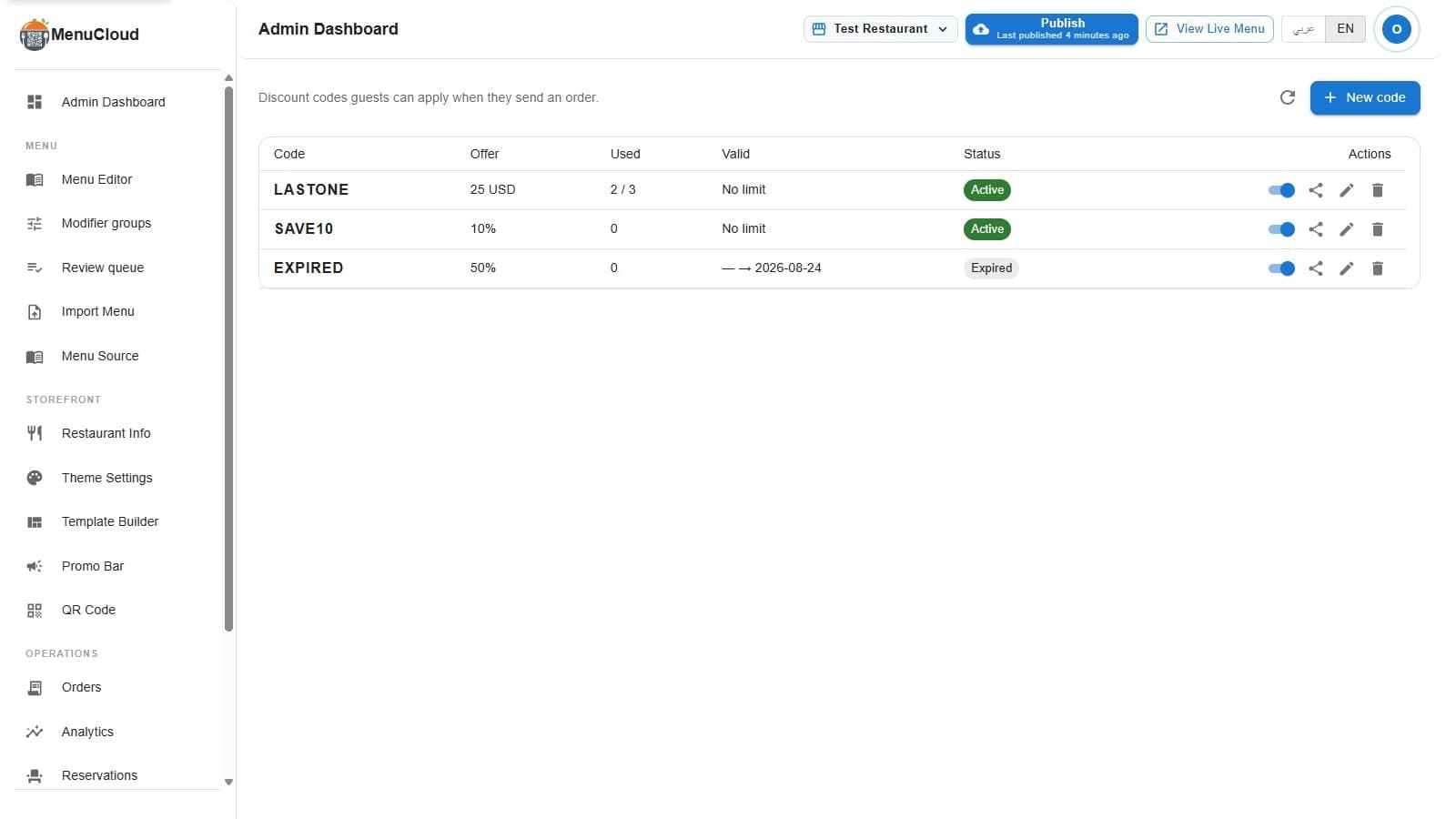
A working list might look like this: LASTONE, a flat 25 USD off, capped at 3 total uses and already redeemed twice. SAVE10, 10% off with no cap at all. EXPIRED, 50% off, its Valid column running through to a date that's now passed, sitting with an Expired chip. None of the three needed a second system to set up. All three came from the same New code form.
What the guest actually sees
The Promo code field doesn't show up on every menu. It only appears once a tenant has created at least one coupon, so a restaurant that never touches this feature never shows a guest an empty discount box that does nothing. The switch flips itself: create a first code and the field appears on the public menu automatically, delete the last one and it disappears again.
When a guest reviews an order before sending it, they see a Promo code field with an "Enter a code" placeholder and an Apply button. Type a code and tap Apply, and the platform checks it right away: is it active, has it started, has it expired, is the cart above the minimum. A working code adds a Discount row above the total, worked out before tax, and the field updates to show the actual amount taken off, something like "45 EGP off," even on a percent-based code. A code that doesn't qualify gets a plain reason instead of a generic error: "This code has expired," "Your order is below this code's minimum," or, on a coupon capped per customer, "Add your phone number above to use this code."
That check is rate-limited too: 15 attempts per 5 minutes for a given device and restaurant. Guessing a code by trial and error runs out of tries fast.
The discount only becomes real at the order
Applying a code in the cart is a preview, not a redemption. The actual increment to a coupon's used count happens later, at the moment the order gets written to the database, inside the same transaction. That matters more than it sounds: if two guests are both racing for the last use of a coupon capped at 3, the database re-checks the real count as part of writing each order, so both can't slip through and push the count past the cap. The server also recalculates the discount amount itself rather than trusting whatever the guest's browser sent along, so a stale cart, or a customer who edited their order after applying a code, can't carry a wrong discount into your WhatsApp inbox.
Reading a code's status without opening it
Every row in the Promo codes list carries a status chip: Active, Paused, Expired, Scheduled, or Used up. None of that is stored on the coupon itself. It's worked out live from the fields already set, the active flag, the dates, the use count against the cap, every time the page loads. Flip the switch in a row off and it reads Paused without touching anything else about the code. Let its Expires date pass and it becomes Expired on its own. A code with a future Starts date sits as Scheduled until that day arrives.
A ready-made post to go with the code
The share icon on each row opens a small studio that builds a downloadable image for the code, either a square 1080×1080 post or a 1080×1920 story, with a caption underneath that copies straight into Instagram, Facebook, or a WhatsApp status. The post's language is picked separately from whichever language your dashboard happens to be in, and the image renders in the browser rather than on a server, the same trick WhatsApp ordering relies on elsewhere: Arabic text needs real shaping to read correctly, and the browser already does that work for free.
A tracked code beats telling the cashier to "just knock off 10 percent" for one reason above the rest: it shows up in the numbers afterward, instead of a discount that leaves no trace once the shift ends. Create one, watch its Used column move for a week, and decide from there whether it earns a permanent spot on the menu.