
Running Your Reservation Book Without a Host Stand
By menu-MENA Team
Published on September 18, 2026
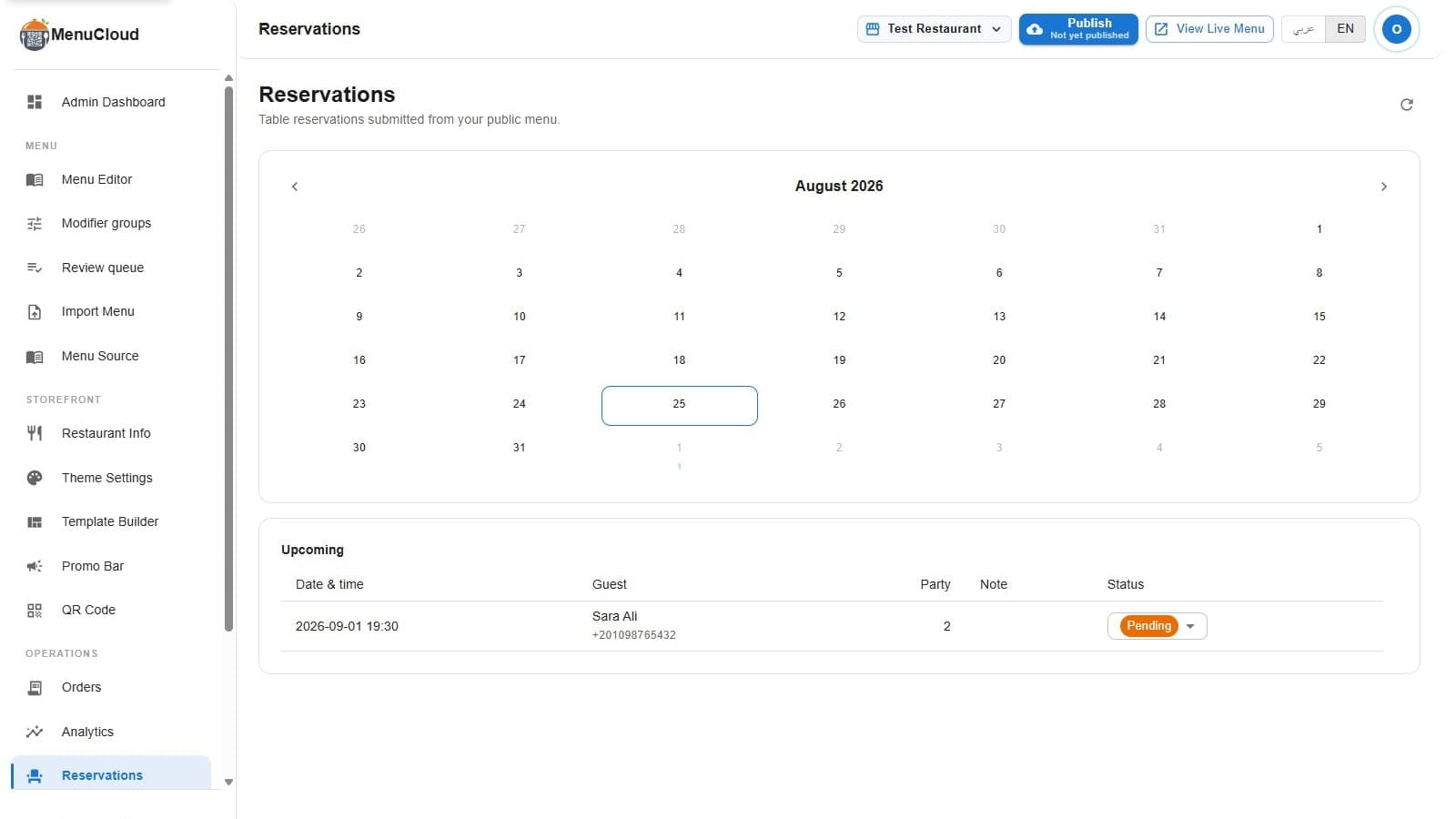
Every restaurant that takes reservations by phone ends up with some version of the same object: a notebook by the register, a whiteboard in the kitchen, a manager who just remembers that Thursday is already tight. The admin reservations page replaces that object without pretending to replace the judgment behind it. Open your dashboard, click Reservations, and the page tells you exactly what it is: "Table reservations submitted from your public menu."
What lands here
Every request a guest submits through the "Reserve a table" form on your public menu shows up on this page automatically. No forwarding, no separate inbox to check by hand. Open it and you're looking at a month calendar on top, and a list underneath.
Reading the calendar
It's a simple month grid: previous and next month arrows on either side of the month name, seven columns for the days of the week. Any day with a reservation shows a small number under the date, so you can see at a glance that Friday has six requests and Tuesday has none. Click a day and the list below filters to just that date. Click it again, or use the "Clear date filter" link that appears once you've picked one, and you're back to the default view.
Why the default view says "Upcoming"
Leave the calendar untouched and the list heading reads "Upcoming." That's every reservation from today onward, soonest first. It filters out anything already in the past, so you're not scrolling through last month's bookings to find tonight's table. If you do need to look something up after the fact, click back to that day on the calendar and it's still there. Nothing gets deleted just because the date passed.
Each row carries five columns: date and time, guest (name on top, phone number underneath), party size, an optional note, and status. The note column is whatever the guest typed into the free-text field on the booking form: a birthday, a table preference, nothing structured.
Moving a reservation from pending to confirmed
Every new request lands as Pending. That's the point of the manual model: nobody gets an automatic yes. You look at the row, decide, and click the status dropdown to set it to Confirmed or Cancelled. The change applies to the screen right away, before the server even answers, so working through ten new lunch requests doesn't feel like waiting on ten separate page loads. If an update fails on the backend, an error message tells you and the page quietly re-fetches the real state, so you're never stuck looking at a status the server disagrees with.
There's a refresh icon next to the page title if you want to pull the latest list by hand, useful when a manager is booking from a different device and you want to see it without waiting for your own next glance at the calendar.
Capping how many people you can seat at once
By default there's no ceiling: guests can request any date and time, and the request always lands as pending. If you'd rather stop your busiest slot from filling past what the kitchen can handle, restaurant info settings has a "Max covers per time slot" field. Set it to, say, 40, and once pending plus confirmed party sizes for a given date and time add up to 40, the next guest trying to book that same slot gets turned away at the form with a fully booked message instead of adding another pending row to your list. Leave the field blank and there's no limit at all, the same behavior as before you touched it.
What this page won't do for you
There's no table map. No floor plan, no seating chart, no dragging a party of four onto table 12. If your restaurant genuinely needs to track which physical table is free at 8:15 versus 8:30, this isn't that system. What it gives you instead is the thing most sit-down restaurants actually need: a shared, always-current reservation book that doesn't live on paper, doesn't get lost between shifts, and doesn't need a dedicated host stand or a separate booking app subscription to run. The guest-facing side of this feature covers what the customer sees when they submit that form. This is what happens on your side once they hit submit.