
What Guests See When They Book a Table
By menu-MENA Team
Published on September 20, 2026
Where the button actually is
There's no separate reservations page to find or bookmark. If you've turned reservations on, a "Reserve a table" pill sits in the sticky bar at the bottom of your public menu, next to the WhatsApp order button and any external ordering link you've added. A guest scrolling your menu sees it the whole time, not buried in a footer or a settings-style menu. In Arabic it reads "احجز طاولة" and the whole thing flips to RTL automatically, same as the rest of the menu.
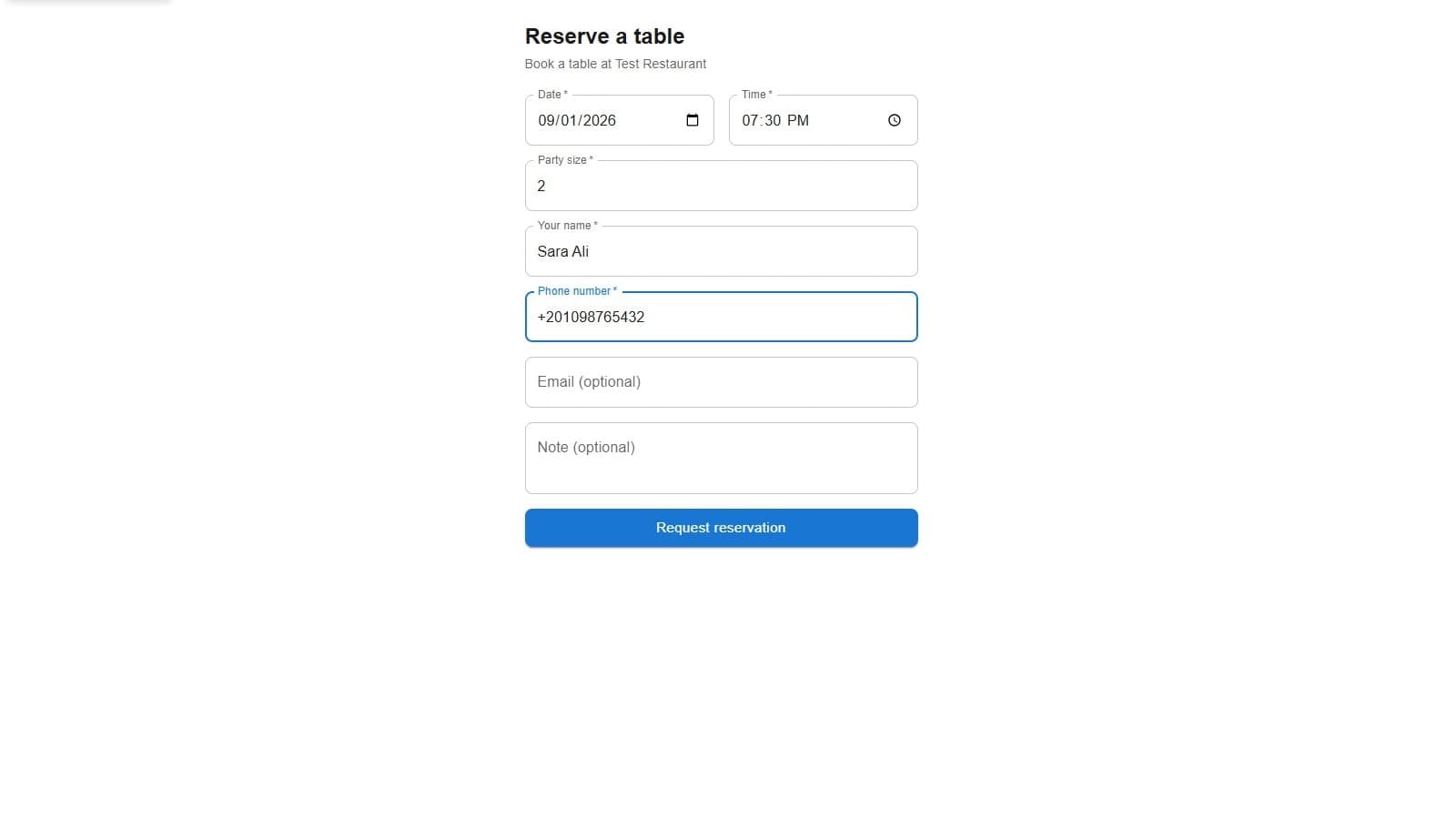
Tap it, and the guest lands on a dedicated page at yourslug/reserve. It's deliberately bare: no menu items, no categories, no header nav. Just "Reserve a table" as a heading, "Book a table at [restaurant name]" underneath, and a form.
The five fields, and the two that are optional
The form asks for date, time, party size, name, and phone number. Those five are required, and the submit button stays greyed out until all five have something in them. Email and a free-text note are both optional.
A few specifics worth knowing:
- Date can't be set to yesterday. The date picker's minimum is today, so same-day requests go through fine, but nothing backdated does.
- Party size defaults to 2 and accepts anywhere from 1 to 50.
- Phone number isn't checked against a strict format. Whatever the guest types goes through, up to 32 characters, which in practice means Egyptian numbers with or without a leading +2 both work.
- Note is capped at 500 characters, and it's the only place a guest can mention anything you don't have a dedicated field for, a birthday, a table preference, a request to sit away from the kids' area.
The button itself says "Request reservation," not "Book now." That word choice matters: nothing on this screen locks in a table. It sends a request that lands on your side as pending, the same status whether it came through this form, a phone call, or someone walking in and asking.
What happens the second they hit submit
The server re-checks everything the form already validated, so a request can't sneak through with a malformed date or an empty name even if someone bypasses the browser. The date has to be a real calendar date (an entry like February 30th gets rejected, not silently rounded), the time has to match 24-hour HH:MM, and the whole request body is capped at 8KB. There's also a rate limit of 20 submissions per 5 minutes per IP address per restaurant, so the form can't be hammered by a script or an over-eager double-tap.
Assuming all that clears, one of two things happens.
Most of the time, it just works: the form disappears and an alert takes its place. "Thanks! We received your reservation request, the restaurant will confirm shortly." That's the whole confirmation. No reservation number, no redirect to a different page. If the guest gave an email address, the same message goes out to their inbox too, and you get an email on your end with the booking details and a link straight into your reservation dashboard.
When the slot is actually full
If you've set a limit on covers per time slot in restaurant-info settings, there's a second possibility. That setting is optional and blank by default, meaning unlimited. But if you've set it to, say, 40 covers at a time, the server adds up every non-cancelled party already booked for that exact date and time before accepting a new one. Two guests submitting for the same last few seats in the same second don't both slip through: the check runs inside a database transaction, so whichever request the server processes second sees the updated count, not the stale one.
When a slot is full, the guest doesn't get a vague failure. They get the same form, still filled in, with one line above the button: "That time is fully booked — please choose another." They change the time and hit submit again. Nothing is lost, nothing reloads.
What it deliberately doesn't check
The form doesn't look at your posted opening hours before accepting a request. A guest can type in 3am and it'll go through as pending, same as any other slot. There's also no table map behind any of this, no way for a guest to request "the corner table" beyond typing it into the note field. Both of those land in your lap to sort out when you review the request, not in the guest's form.
What's actually being saved
Beyond the reservation record itself, the guest's name, phone, and email (if given) get folded into your customer list, the same one WhatsApp orders build up. If someone has ordered from you on WhatsApp before and now books a table through this form using the same phone number, it's one customer record with both an order and a reservation against it, not two strangers who happen to share a name.
That's the whole guest side of it: one page, five required fields, and a message that tells them exactly what did and didn't just happen.