
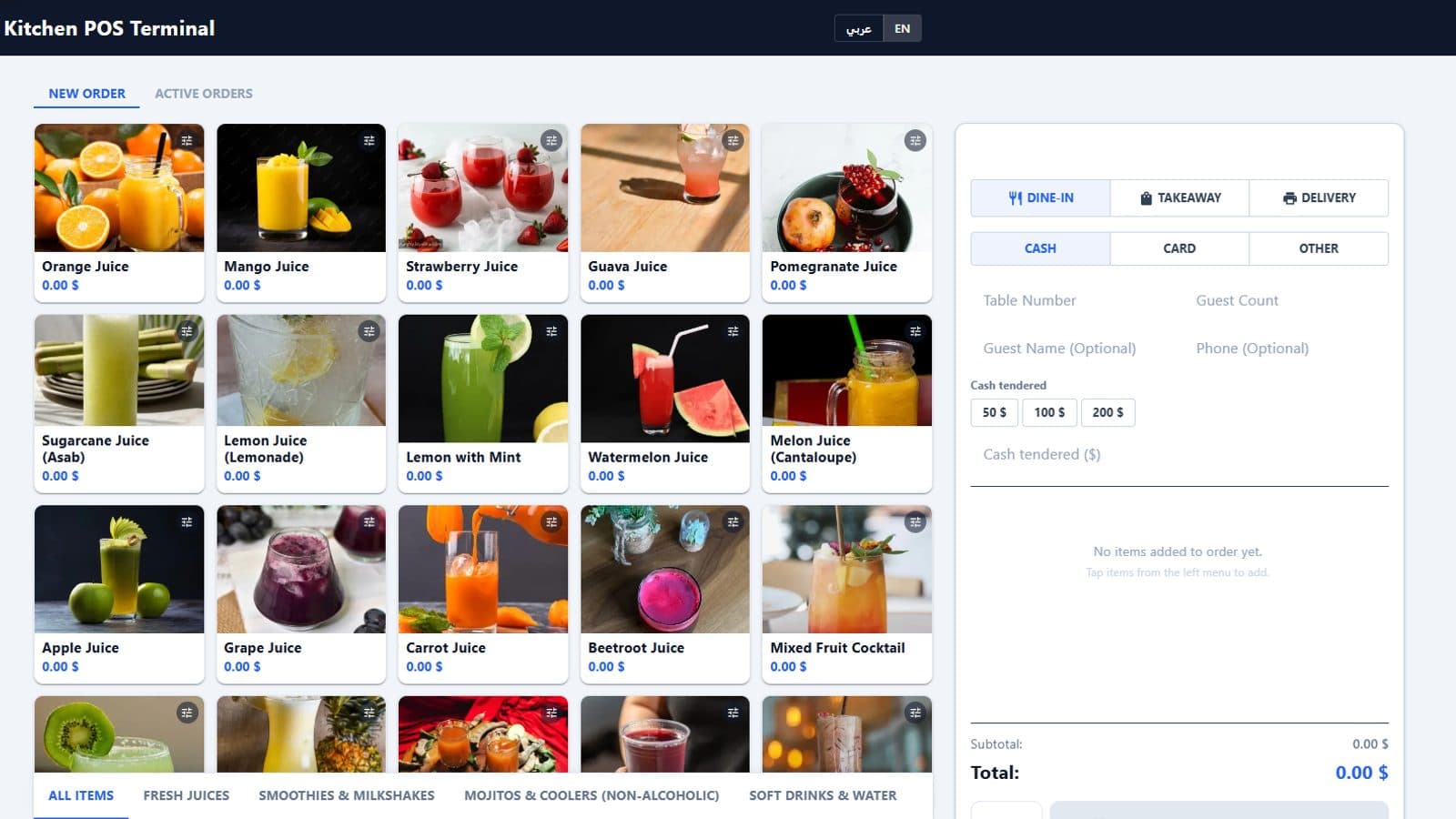
Behind the Register: How the POS Terminal Works
By menu-MENA Team
Published on September 2, 2026
The Orders board exists because a WhatsApp order needs somewhere to land. But not every order starts on WhatsApp. A guest sits down, a server takes their order at the table, or someone walks up to the counter and pays cash on the spot, none of that goes through a customer's phone. That's what the POS terminal is for: a register screen, at /pos, that a staff member drives directly.
One device code, then personal PINs
You don't hand every cashier the same login. A terminal is paired to your account once, from POS Settings, using a short device code, the same pattern you'd expect from pairing a smart TV. After that one-time setup, staff never see a password on the floor. Each person logs into a paired terminal with their own PIN, and that PIN is what ties every shift, every void, and every order back to a specific staff member instead of "whoever was at the register."
Shifts are tracked, not assumed
Opening the terminal opens a shift: a running record of who was on, when, and what cash moved during it. If a staff member needs to pull cash out for a supplier delivery or drop extra change in, that's logged as a paid-in or paid-out event on the shift, not scribbled on a notepad. Closing the shift generates a report, so what's actually in the drawer can be checked against what the system says should be there, the same day, not at month-end.
Voids need a reason, not just a tap
Every void goes through a reasons list, categorized and set up in advance, so "why was this removed" is answered before the line disappears from the ticket. Reasons that need sign-off route through a manager override screen that only opens with a manager's own PIN. That PIN is the approval. There's no shared override code floating around that means the log just says "manager," it says which manager.
Held orders keep the register free
A table that orders a round of drinks and decides on food later doesn't need to occupy the terminal that whole time. Holding the order parks it completely, cart, modifiers, and all, and the register is free to ring up the next guest. Pull the held order back up whenever they're ready, and it's exactly as they left it.
One ticket per kitchen station
If you've set up Kitchen Stations (Grill, Drinks, Dessert, whatever your kitchen actually uses), the cart panel doesn't send one long ticket to one printer. It groups every line by the station it belongs to and prints a separate ticket to each one, so the drinks station isn't reading through a burger order to find the one thing that's theirs. Printing itself goes out as raw ESC/POS commands through QZ Tray to whatever thermal printer is connected, USB or network, the same protocol real receipt printers already speak.
Delivery zones factor into the total automatically
If an order includes delivery, the checkout total pulls from whatever delivery zones you've configured rather than a flat fee typed in per order. Zones are set up once, each with its own active/inactive toggle, and the terminal applies the right one at checkout without a cashier doing the math.
Payment methods and checkout, your way
Cash is there by default, but the Payment Methods manager lets you add whatever else you actually take, card, wallet, a specific gateway, without touching code. Checkout behavior is configurable too: how long an idle terminal waits before auto-logging out, whether dine-in orders require a guest count before they can be sent, how your return window is measured, and where your order numbers start counting from. None of it is hardcoded to one restaurant's workflow.
It looks like your restaurant, not a demo
POS Settings includes theme presets built for a touch screen up close, not a desktop dashboard viewed from arm's length, plus size controls so buttons scale to how your team actually holds the device. It's the same underlying team permissions as the rest of the admin panel, so who can open POS Settings at all is controlled the same way everything else is.
The Orders board and the POS terminal will often be running at the same restaurant, at the same time, one for the guest who never leaves their phone, one for the guest standing at the counter. Neither replaces the other. They're both writing to the same order history underneath.