
Why Your Digital Menu Shows Up in Google Search
By menu-MENA Team
Published on September 14, 2026
Nobody has to submit your menu to Google
Type a restaurant's name into Google and a paper menu taped to the door doesn't show up. A page that lives at a real URL can, and every menu-MENA page has lived at a real URL since the day it went live: menus.mena-x.com/your-slug. Nobody on your team files anything with Search Console or installs a plugin to make that happen. It's built into the page your customers already scan with the QR code on their table.
This post is a walk through what's actually running behind that, using the real field names in your dashboard, not a generic "SEO checklist" that could apply to any website.
What's on the page for a crawler to read
The <title> tag and meta description on your public menu default to your restaurant's name and slogan, both pulled straight from the Restaurant info you've already filled in. Alongside them, the page carries a set of bilingual search terms built automatically from your name: "menu " and " menu" in English, "منيو " and " منيو" in Arabic, plus " prices" and "اسعار " variants. You don't type these in anywhere. They're generated from the name field the moment the page renders.
Markup that tells Google this is a restaurant
Underneath the visible page, every menu carries schema.org markup with @type: Restaurant: your name, the page's own URL, your slogan as the description, your logo as the image. If you've filled in an address, a phone number, or an email on the Restaurant info page, those go in too, as a proper postal address and telephone field rather than plain text. Social links you've added, Instagram, Facebook, TikTok, X, get normalized into full profile URLs under sameAs, whether you typed a handle like @yourplace or a full link. Your WhatsApp number is deliberately left out of that list. It's a contact channel, not a social profile, so it doesn't belong there.
None of this is required. A field you've never filled in is simply absent from the markup rather than showing up as an empty string, so a restaurant that hasn't touched its social links yet still gets valid, complete markup for what it has set.
If business hours are configured, they go in as a proper openingHoursSpecification too, which is part of why a Google listing can show "Open now" instead of just a name and a link. Everything that feeds this markup lives on the same Restaurant info page where you set your address and social links in the first place, so filling that page in fully does double duty.
A sitemap that keeps itself current
menus.mena-x.com/sitemap.xml isn't a file anyone edits. It's generated on request and cached for an hour, re-querying every tenant on that cycle so a newly published menu, or a restaurant moving out of its trial into an active subscription, shows up there without a redeploy. Tenants that have canceled or gone past their grace period drop out of the list automatically, so the sitemap never points Google at a menu that no longer answers. Each entry lists both language versions of that menu using the same ?lang=en / ?lang=ar alternates the page itself already runs on, and for a tenant with a verified custom domain, the sitemap lists that domain instead of the default menus.mena-x.com address, matching the canonical the page itself points to.
A companion robots.txt keeps the private side out of all this: /admin, /api, /login, /signup, /onboarding, and /invite are all disallowed, so crawlers only ever see the public storefront.
The image that shows up when someone shares your menu
Paste a menu-MENA link into WhatsApp or Facebook and the preview card isn't a generic placeholder. It's generated on the fly per restaurant: your logo (or a plate icon if you haven't uploaded one yet), your name, your slogan if you've set one, over a gradient built from your own brand color rather than menu-MENA's. It reads straight from your published menu, so it stays in sync with whatever you last saved.
Setting your own title and description
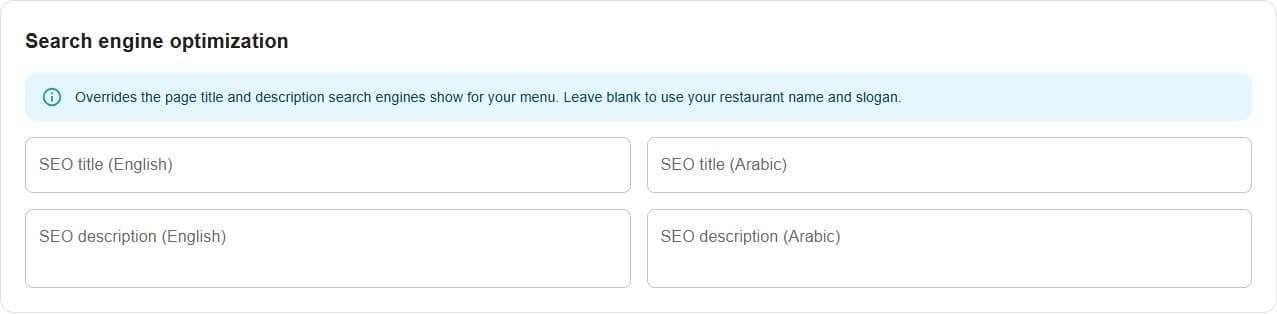
Open Restaurant info under Storefront in the admin sidebar and scroll to the Search engine optimization section. Four fields sit there: SEO title (English), SEO title (Arabic), SEO description (English), and SEO description (Arabic), with a note underneath explaining what they do: they override the page title and description search engines show for your menu, and leaving them blank means Google keeps using your restaurant name and slogan instead.
This is the one part of all this that's worth spending a few minutes on. Your restaurant's actual name might not be what a hungry person nearby types into Google. Include your neighborhood, your dish, whatever the local search actually looks like, and the override field is where that goes.
What this doesn't do
None of this promises a ranking position. Schema markup, a sitemap, and a share image make a page legible to a crawler and clickable in a results list. Whether it ranks depends on the usual things: how many people search for your restaurant by name, how the page performs, what else is competing for that query. What menu-MENA does is make sure a fast-loading, correctly-tagged, bilingual page is what's waiting on the other end of that click, from the first day of your 14-day trial, not something bolted on after the fact.