
Every Menu Change, Timestamped: The Audit Log
By menu-MENA Team
Published on August 29, 2026
Who touched the menu while you weren't there
You own two branches and you're not standing behind either counter today. A manager updates a price on the app while you're at the other location, someone marks a dish sold out an hour later, and by evening the coupon list looks different than you remember. Group-chatting your staff to ask "did anyone touch the menu today?" is not a system. The Audit log page at /admin/audit-log is: it opens with the line "Every change made by you and your managers, newest first," and it means that literally.
What one entry actually shows
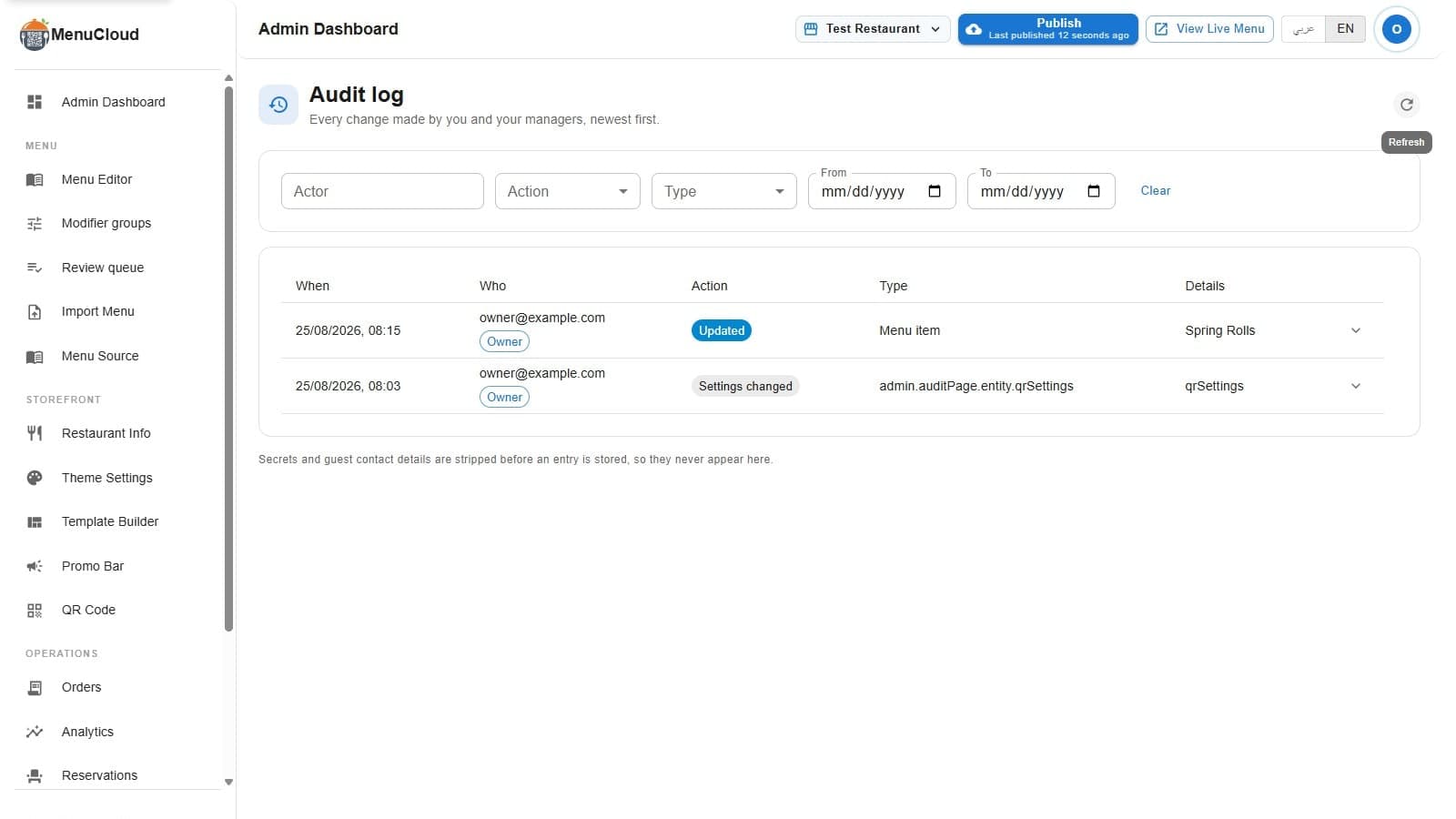
Each row has five columns: When (a localized timestamp), Who (the actor's email, with a role chip reading Owner or Manager), Action (a colored chip: Created, Updated, Deleted, Published, Unpublished, Invited, Revoked, or Settings changed), Type (Menu item, Category, Modifier group, Template, Coupon, Team member, Domain, and so on), and Details, a short summary, usually the item's name, the coupon code, or the member's email rather than a raw database id. If the tenant has more than one branch, the row also shows which branch the change landed on, so "who changed the price on the Maadi branch" is one glance, not a guess.
Filtering down to one change
Above the table sits a filter row: an Actor box (email or user id), an Action dropdown, a Type dropdown, and From/To date pickers, plus a Clear button. Pick a manager's email and a date range and the table narrows to just their day. The dropdowns and date fields filter the moment you change them; only the Actor box waits about a third of a second after you stop typing, so it isn't firing a request on every keystroke of an email address.
Opening the diff
Rows that changed a value carry a small expand arrow on the right. Click it and a before/after block unfolds underneath, showing the actual fields that changed as formatted JSON, always left-to-right even when you're reading the rest of the page in Arabic, since it's data, not prose. Not every row has this. A deletion, for instance, has nothing left to show a "before" state against, so those entries carry just the summary and no diff arrow at all.
What never makes it into the log
Before any entry is written, its diff is checked field by field. Anything that looks like a guest's phone number, WhatsApp number, email, name, or address gets replaced with [redacted]. Anything that looks like a credential, a password, an API key, a card number, a CVV, an IBAN, a session token, gets the same treatment. This runs on the field name, not a judgment call about the value, so it catches the field consistently every time regardless of what got typed into it.
Invite links get a separate protection: the link itself is a working credential (anyone holding it can claim the invite), so the log never stores it. It stores a one-way fingerprint instead, enough to tell two entries are about the same invite, useless to anyone trying to lift a usable link out of the log. And if a single change produces an unusually large diff (a bulk template import, say), the entry stores a size marker instead of the full payload rather than growing an already-large record without limit.
It never blocks your work
Writing an audit entry happens after your change is already saved, and it's designed to fail silently on its own end: if the log write itself has a problem, your edit still goes through. Nobody's price update or category rename waits on, or gets rejected by, the logging step. The trail is a record of what happened, not a gate in front of it.
Owner-only, enforced where it counts
A manager who navigates to /admin/audit-log gets redirected straight back, but that page-level check is a courtesy, not the actual security. The API behind the page checks the caller's role on every request and returns a flat refusal to anyone who isn't the owner. That matters for the same reason the log exists in the first place: if a manager could read (or worse, quietly confirm the absence of) an entry about their own change, the trail would only be as trustworthy as the person it's watching. For more on what separates an owner's access from a manager's day to day, see who can edit what.
Where the entries actually come from
This isn't a log of one feature, it covers most of the admin panel: menu items and categories, modifier groups, coupons, branch creation and menu copies, team invites and revocations, custom domain changes, payment gateway settings, QR code settings, theme and promo bar edits, and restaurant info. Template Builder publishes, unpublishes, duplicates, and imports show up here too, though that's a different record than the design snapshots inside the builder itself, which track your typography and color experiments rather than who published what. If you're after undoing a design change specifically, that's template version history, not this page.
None of it depends on anyone remembering to write something down. The entry gets created the moment someone clicks save, on whichever branch they were editing, with their name attached, whether they meant for you to notice or not.